Lead
·—
The melody: a buzzing pulse with a sweeping width, a bright saw or a soft triangle, with vibrato on long notes.
A native Mac player for Commodore 64 music
All 60,000 tunes of the High Voltage SID Collection, fingerprinted by how they sound, with visualizers that draw the chip as it plays. Made of Liquid Glass, made for the Mac, built on Phosphor's open-source engine.
Free and open source · macOS 27 or later · Apple silicon
The chip
The SID chip inside the Commodore 64 had three oscillators, four waveforms and one resonant filter. Composers built whole soundtracks from that: arpeggios flickering fast enough to pass for chords, bass and drums taking turns on a single voice. Resonance shows you how — the level, note and waveform of every voice, decoded from the chip's registers as the tune plays. Here's a tune doing just that, silently.
The melody: a buzzing pulse with a sweeping width, a bright saw or a soft triangle, with vibrato on long notes.
One voice racing through a chord fifty times a second, swept through the resonant filter.
An octave-bouncing bass, interrupted by noise-burst snares and pitch-dropping kicks.
 Recognise the bars? They're the app icon: three voices, each with its peak-hold cap.
Discover by sound
In the background, Resonance plays every tune in HVSC silently and learns how it sounds: its waveforms, its arpeggios and filter sweeps, its drums and its bass. Then it can tell you what else sounds like the tune you love, across all 60,000 of them.
Now Playing
Press ⇧⌘F and the window becomes a player: the tune, its composer and a visualizer driven by the SID's own registers, frame by frame.
A glowing ring per voice that swells with its envelope and wobbles with its waveform's harmonics.
24,000 points on a turning sphere, a third per voice, rippling with its envelope and sending a wave across on every new note.
A ring of spectrum bars per voice, lows meeting at the top and highs at the bottom, the rings turning opposite ways.
Every note becomes a point in 3D, placed by its timbre: the tune draws its own map as it plays.
The collection
No collection yet? Click the download arrow next to Collection and Resonance fetches the High Voltage SID Collection. When a new release comes out, it says so, updates in one click, and shows what the release added: new tunes, new composers, new STIL notes.
Your music
Heart a tune into Favourites. Make as many playlists as you like, drag tunes onto them from anywhere, and reorder them by hand. And wherever the music comes from, Resonance says so: “Playing from Rob Hubbard”, one click back to it.
Features
A SwiftUI app with a sidebar, a sortable playlist, an inspector and a floating glass transport bar — the layout you know from Music, made for SID.
Something SID players almost never do. A SID tune is a small C64 program, not a recording, so there's nothing to jump to: Resonance runs it there silently, sixty times faster than it plays, and the bar shows the engine winding up to the point you chose. Drag, click, or use Control Center's slider.
A radio of random tunes from all of HVSC, picked one ahead, never repeating anything you've heard since launch.
⇧⌘R
The inspector shows each voice as a scope, as level bars with peak hold, or as its envelope, with the note and waveform it's playing.
A card for the composer, with STIL's notes on them and all their tunes a click away. Covers read “Cover of … by …”, STIL's stories are set as quotes, and HVSC's list of known bugs shows on the tunes it names.
Shows up in Control Center's Now Playing, with its position slider and 15-second skips, answers your keyboard's media keys, and puts every command in a Playback menu.
reSIDfp, libsidplayfp's reference emulation, is the default. SIDLite direct is the lightest; both scrub. Phosphor's SIDLite and reSID are still there.
Plays 2SID and 3SID tunes, mirrors 2SID tunes into stereo, and widens mono ones: Subtle, Medium or Wide.
Colour the voices in every visualizer: Resonance, C64, Noir, Ember, Abyss, Phosphor, Greyscale, or your own three colours and background.
The Songlengths database moves on at the right moment; unknown tunes get your default length. Step through subtunes with ⌥⌘← →.
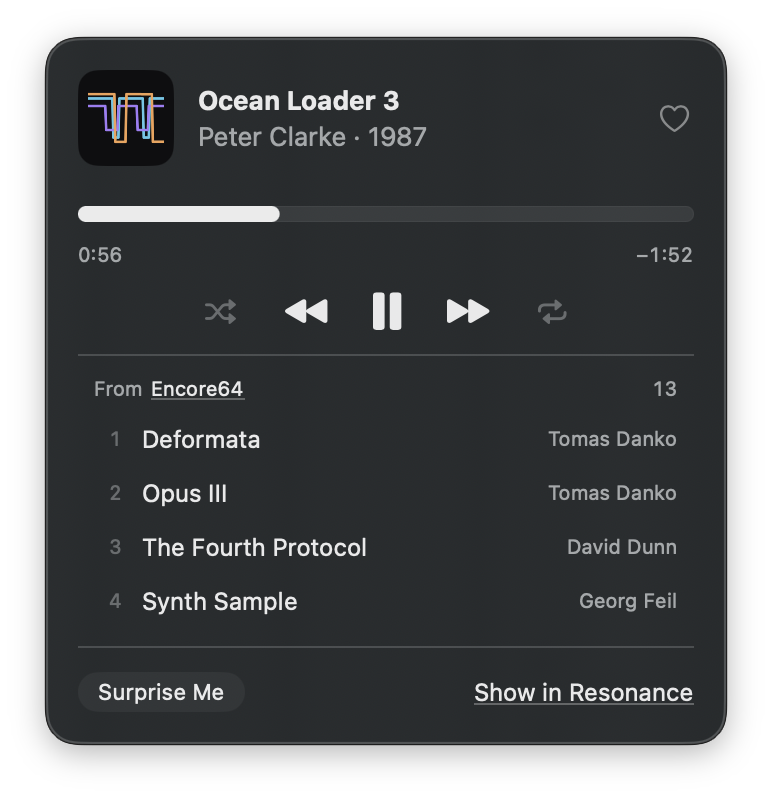
Click the icon, or press ⌃⌥⌘P in any app: the tune and its voices, the heart, the controls, what's next in the list it plays from, Surprise Me, and a link that opens the tune in Resonance. Close the window and the music plays on.
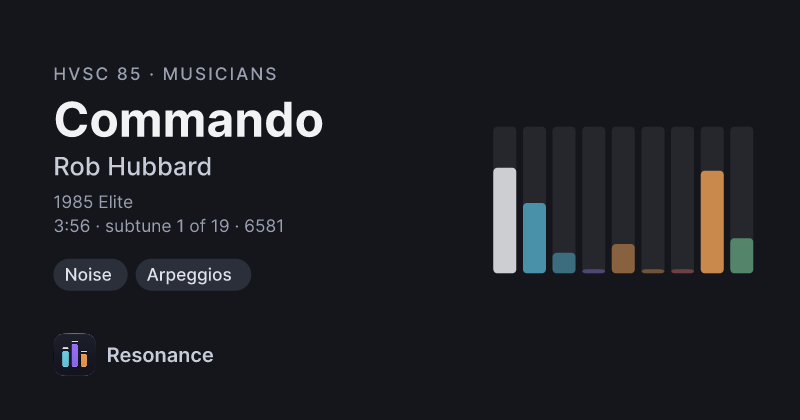
Share… makes a short link to any tune in HVSC. Pasted into Messages, Slack or Discord, it shows the tune's card: who made it, when, and its sound fingerprint. A click opens it in Resonance, which finds it in your collection, even an older release, and offers the update if it's missing. No Resonance yet? The link's page has the download.
Resonance is its own app, with its own favourites, history, playlists, settings and collection. One click imports Phosphor's settings, favourites, play history and HVSC collection. Nothing in Phosphor changes.
The library
Musicians, Games and Demos live in the sidebar, composers by handle and real name, with their tune count and years. Or just type: composers come first, then tunes, ranked across a category or all of HVSC, and typos still find their tune.
Keyboard
Every Playback command has a shortcut. Press one here and watch it light up.
Under the hood
Resonance is its own app, but it doesn't reinvent the library. It compiles the engine of Phosphor, Marcin Spoczynski's open-source Rust player, without changing a line, and talks to it through UniFFI, so improvements upstream flow straight into the Mac app. For the sound it adds its own player around libsidplayfp's reSIDfp, rendered straight into the audio output.
Same engine, different jobs. Phosphor runs on three platforms and drives real hardware: got a USBSID-Pico or an Ultimate 64, use Phosphor. Resonance is the Mac app around that engine: the visualizers, Sounds Like, the menu bar player, share links, and reSIDfp for the sound. Use both if you like: Resonance imports Phosphor's settings, favourites and history, and nothing in Phosphor changes.
Checked in November 2026 against each one's own site: Phosphor, whose engine Resonance runs; SIDPLAY, the classic Mac app, last released in 2016 and kept building by a community port; flipSID, new in 2026; and JSIDPlay2, the Java one. In the browser there's also DeepSID.
| Resonance | Phosphor | SIDPLAY | flipSID | JSIDPlay2 | |
|---|---|---|---|---|---|
| Made for | The Mac, in SwiftUI | macOS, Windows, Linux, in Iced | The Mac, in Cocoa | Windows, Mac, Linux | Java; also the browser |
| Apple silicon | ✓ | ✓ | Through a community port | ✓ | With OpenJDK 21 |
| SID emulation | reSIDfp, SIDLite, reSID | SIDLite, reSID | libsidplayfp | reSIDfp, reSID, resid-fp | reSID, reSIDfp |
| HVSC download, Songlengths & STIL | ✓ | ✓ | ✓ | ✓ | ✓ |
| Playlists & favourites | ✓ | ✓ | ✓ | ✓ | ✓ |
| Sounds Like | ✓ | — | — | — | — |
| Visualizers | Halo, Particles, Radial, Sound Map | Bars, Scope, Tracker | Oscilloscope | — | Oscilloscope |
| Small player | In the menu bar, from any app | A compact window | — | — | — |
| Control Center & media keys | ✓ | — | — | — | — |
| Share links | ✓ | — | — | — | — |
| Real SID hardware | — | USBSID-Pico, Ultimate 64 | ASID over MIDI, SIDBlaster | Ultimate 64, HardSID | HardSID, SIDBlaster, ExSID |
| Also | Imports Phosphor's settings and history | Pedalboard FX, web remote, karaoke, Assembly64 | — | STIL search, filter curves | Up to 15 SIDs, NetworkSID |
| Last release | 0.1.0-alpha.3, 2026 | 0.4.7, 2026 | 4.2, 2016 | 0.3.0, November 2026 | 4.14 beta |
| Licence | MIT; GPL as built | MIT | GPL | GPL | GPL |

Download
Checking for the latest release…
Open the download and drag Resonance into Applications.
No HVSC yet? Click the download arrow next to Collection in the sidebar. Already have it? Choose its folder in Settings → Collection, or import Phosphor's in Settings → Advanced.
Surprise Me starts the radio. Or drop SID files, folders and M3U playlists onto the window.
You'll need Xcode 27 and Rust (brew install rustup && rustup default stable). The first build compiles the Rust engine and takes a few minutes; after that Xcode rebuilds it incrementally.
# Get the source
git clone https://github.com/ErikLuimes/resonance.git
cd resonance

# Build and launch
xcodebuild -project apple/Resonance.xcodeproj -scheme Resonance \
  -derivedDataPath apple/build/DD build
open apple/build/DD/Build/Products/Debug/Resonance.app
Questions
No. Resonance is its own app, with Phosphor's engine built in, and it downloads HVSC itself. Already use Phosphor? Settings → Advanced → Import from Phosphor brings over its settings, favourites, play history and HVSC collection. Nothing in Phosphor changes, and the two can run side by side.
No. Click the download arrow next to Collection in the sidebar and Resonance fetches the newest release of the High Voltage SID Collection, free, from an HVSC mirror. When a new release comes out it says so, and updates in one click. Already have a copy? Choose it in Settings → Collection.
Yes. Drop SID files, folders or M3U playlists onto the window, or press ⌘O; they go into My Playlist. Tunes outside HVSC play the same way, they just don't get STIL's notes.
Not yet. Resonance plays through software emulation: reSIDfp, SIDLite or reSID. For real hardware, use Phosphor.
Macs with Apple silicon, running macOS 27 or later.
Your playlists are M3U files in ~/Library/Application Support/Resonance/Playlists, My Playlist is session.m3u next to them, and your favourites, play history and sound fingerprints are in the same folder. Settings live in Resonance's own preferences.
Hardly any time: the first time, Resonance imports the published fingerprint set (about 37 MB), which covers all of HVSC, so Sounds Like works straight away. A background scan at low priority fills in anything it doesn't cover; you can pause it in Settings → Collection.
A SID tune is a little C64 program, not a recording, so there's nothing to jump to. Resonance runs the tune to the point you chose silently, about sixty times faster than it plays: a second or so per minute of tune on reSIDfp, less on SIDLite direct. The bar shows the engine winding up to it, and the sound comes back when it arrives. The SIDLite and reSID engines play in real time only and can't scrub.